Customer Support

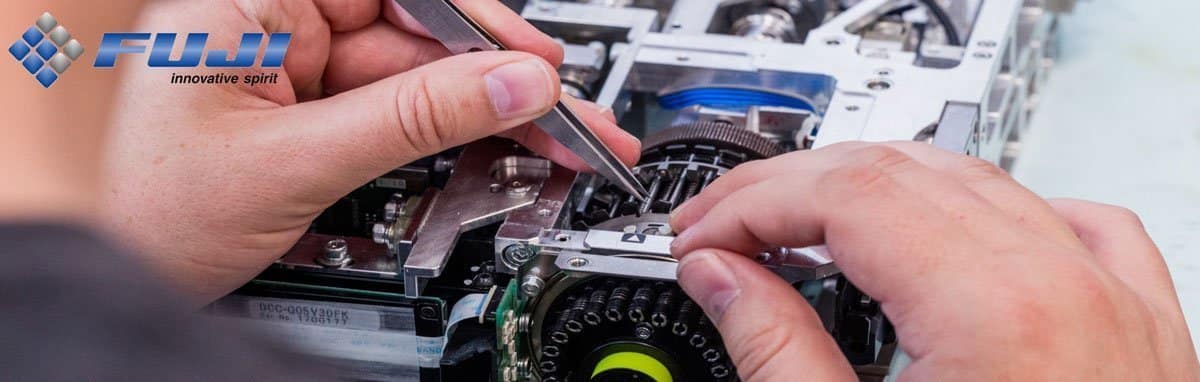
Fuji customer service takes care of new installations, initial on-site training, emergency telephone support, technical service and equipment repair. Although we are headquartered in Kelsterbach, Germany, we also have several regional offices to ensure that an engineer is always available to respond to our customers’ needs.

  • On-site technical support from our competent, factory-trained service personnel with many years of experience in the SMT business
  • The helpdesk primarily provides support for hardware and software problems, but also for queries from customers in other service areas
  • Device repair for problems with your placement head or other devices that you cannot fix yourself
  • Training is available for all our current machines or software systems. Customized courses can be arranged if one of our standard courses does not meet your requirements
  • Support of the customer process for practical tests, evaluations, customized debugging or NPI consulting
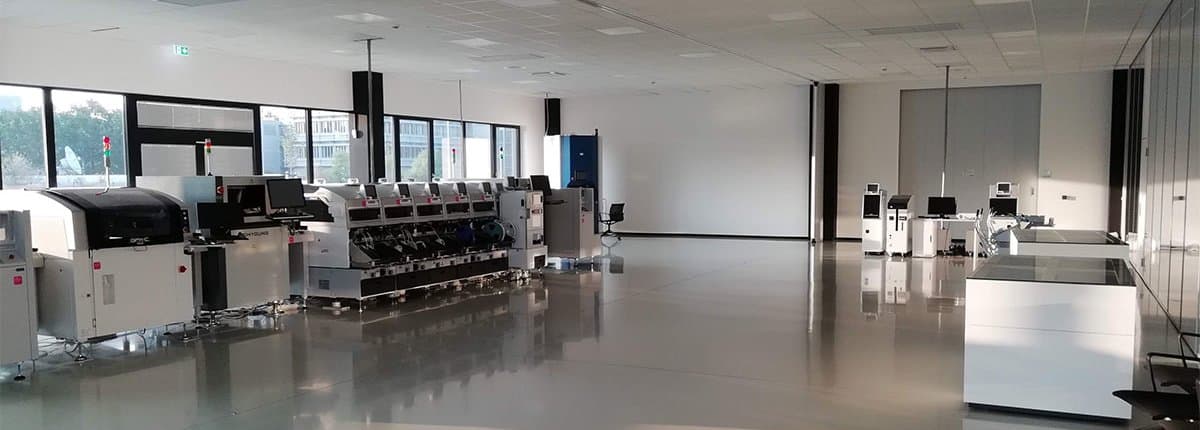
  • In an ultra-modern demonstration centre there is an “intelligent factory”, in which includes all the major equipment we currently sell. In this environment you can compare your existing system or other systems under consideration with the latest FUJI equipment. Demos with cycle time studies can be run with your boards and parts if previously supplied.
  • Utilization analysis services are available through the Fuji sales department. To ensure you get the most out of your existing equipment, our experts will evaluate your manufacturing processes and make recommendations based on product mix and required throughput.
Technical Service

Our competent, factory-trained service personnel for software and hardware support you with many years of experience in the SMT business and know how important Fuji equipment is for your production process.
The industry’s best service team of 40 technical engineers supports you.

Software
Our team can help you with software questions, troubleshooting or Windows and network issues.
We also help our customers integrate with their existing in-house ERP systems and share our information on parts inventory and placement efficiency. The Nexim system is database based and can be shared on a network server to enable connectivity with other software systems. We also work closely with many software vendors to ensure compatibility in any customer environment.(see also FUJI Smart Factory)

Hardware
Our team takes care of new installations and offers technical service at the highest level. We also work closely with other machine manufacturers in the production line to ensure compatibility in any customer environment.

Vcard Vcard

Technical Service

Our competent service team, consisting of 40 Fuji technicians, is at your side with expert knowledge and customer-oriented thinking and acting.

Mondays to Fridays 7:00-18:00

Phone +49 6107 6842-237
Fax:+49 6107 6842-220

fu.helpdesk@fuji-euro.de

Helpdesk

The helpdesk supports you in case of hardware and software problems via the classic telephone service, but also with the help of technical equipment and software (remote control, live support system).
In addition, you will receive help with inquiries in other service areas.

Vcard Vcard

Service hotline

Mondays to Fridays 7:00-18:00

Phone +49 6107 6842-237
Fax:+49 6107 6842-220

fu.helpdesk@fuji-euro.de

Unit Repair

We offer our customers the Unit Repair service to carry out necessary repairs with little personal effort and even less loss of production. We help with all repairs and carry out the work to a high standard and as quickly as possible.

Repairs are as follows:

Training

In our state-of-the-art training centre in Kelsterbach (Germany) and Budapest (Hungary) we offer comprehensive training courses on machines and software. Our team of trainers consists of experienced professionals. They bring their own machine and application knowledge as well as practical experience to the classroom to teach you the correct and efficient use of Fuji products.

We offer customized training courses according to market requirements. Our training program is based on practical requirements and solutions for daily production.

The topics are presented by competent experts.

In addition to tailor-made training and individual training courses on site, we offer the following topics:

Courses

Minimum number of participants: 3 people

SNC & AHC Technician

Duration: 2 days (09:00-16:00 each)
Target group: Maintenance and troubleshooting

The participants learn:

  • Structure and functions of the machine
  • Clean the nozzle and use the bearing function
  • Prepare nozzle automatically after job setup
  • Head cleaning and testing
  • Head battery change and MT reset
  • Data management
  • Advanced Nozzle and Head Maintenance
  • Maintenance and troubleshooting

The target groups are employees of the maintenance and troubleshooting team.

These are specialists who have been working in the manufacturing sector for a long time.

The Group is responsible for:

  • maintain or repair the systems
  • Instruct and train operators of the systems
  • ensure the availability of the systems and their smooth operation
  • continuously improve the process
  • Order spare parts and maintenance materials

The training content is conveyed in lectures, jointly developed discussions and also in partner and group work.

  • SNC Specification/Supported Nozzle
  • Job Selection Panel
  • Change Nozzle Operation and Inspection Settings
  • Change water
  • SNC Maintenance and Troubleshooting Explanation of the Accessory Software
  • Machine and module configuration
  • Advanced Nozzle Maintenance
  • SNC data management
  • AHC
  • AHC Specification/Supported Head
  • Structure of the AHC
  • AHC operation:
  • Head cleaning (air and oil)
  • Head inspection
  • Measurements before and after cleaning
  • Changing head batteries with AHC
  • Head MT-reset
  • AHC Data Management
  • Head Cleaner Tool
  • Advanced Head Maintenance
  • Troubleshooting
  • Maintenance of the AHC
  • Q & A structure of the SNC

Feeder Maintenance & Repair

Duration: 2 days (09:00-16:00 each)
Target group: Maintenance and troubleshooting
Recommendation: Attend Technician Training

The participants learn:

  • Structure and functions of the machine
  • Feeder types, supported feeders
  • Feeder maintenance and inspection
  • Errors and troubleshooting
  • Feeder adjustment and repair
  • Feeder maintenance with AFMU
  • Adv. feeder maintenance

The target group are employees of the maintenance and troubleshooting teams, familiar with the production environment

These are specialists who have been working in the manufacturing sector for a long time.

The Group is responsible for:

  • maintain or repair the systems
  • Operator responsible for feeder maintenance.
  • continuously improve the process
  • Order spare parts and maintenance materials

Lectures, joint discussions, workshop, partner exercises, team work, case studies

***Participants can bring customer feeders for training***

  • Intelligent Feeder Inspection Jig
  • Spec/supported feeder
  • Structure of the feeder
  • Feeder maintenance of all sizes
  • Feeder repair
  • Handling parts lists correctly
  • Feeder troubleshooting
  • AFMU Spec, Supported Feeder
  • Feeder maintenance and inspection with AFMU
  • Troubleshooting AFMU
  • AFMU Maintenance and changing consumables
  • Adv. feeder maintenance
  • Q & A

NEXIM programming for sFAB

Duration: 5 days (each 09:00-16:00)
Target group: Programmers, work preparation, shift supervisors
Prerequisite: Working with Windows components

The participants learn:

  • Understanding and mapping the sFAB structure
  • Nexim user interface
  • Importing CAD/BOM
  • Creation of jobs, parts, component descriptions, packaging and brands
  • Optimizing products
  • Program correction on the machine
  • Advanced functions of Nexim
  • Evaluation of performance
  • Processing jobs on the machine

The target groups are employees who create, manage and administer NEXIM programs (programmers, work preparation, shift leaders)

The training content is conveyed both in lectures, jointly developed discussions, as well as in partner and individual work.

Independent exercises are carried out to deepen the knowledge.

  • Structure of the SW/What is Nexim (database, Plan-Do-See etc.)
  • Nexim interface – Smart Operation
  • Working through the “Creating Job’s” workflow together
  • Creation of components, component descriptions, packaging and brands
  • Special functions of the sFAB (cut & clinch, adjoining etc.)
  • Special features of the Sidelight Camera
  • Creating and configuring a production line
  • Optimize/Insert Order
  • Import of Spec Data
  • Handling radial and axial springs, cutting unit
  • Additional functions (scan, search, compare, CSV, data checker, approval)
  • Report/Floor Insight
  • Bottom side check, position correction, capture image on the machine
  • Nexim STM (multipurpose mark, TVR)

NEXIM programming “light”

Duration: 3 days (09:00-16:00 or 14:00)
Target group: Line employees

The participants learn:

  • Editing programs that have already been created
  • Changing component descriptions, packaging, nozzle assignments
  • Working with “MEdit” (NXT)/On M/C Edit(AIMEX3, NXTR)
  • Optimizing programs and feeder setup
  • Dealing with NKS (new kitting station, component verification)
  • Working with the Accessory SW for process monitoring

The target group are employees who execute particular program adjustments and optimization tasks while working on the production line

The knowledge will be imparted in lectures, joint discussions as well as during partner – and individual practice.

The acquired skills will be deepened with individual exercises.

  • NXT/AIMEX/NXTR concept (modules, heads, units, etc.)
  • Introduce NEXIM (Plan – Do – See)
  • Program Structure/Nexim Smart Operation
  • Editing part data (VT, component description, nozzle, etc.)
  • Selection of line, process parameters, optimization settings
  • Transfer of programs
  • Case study in the event of a machine fault (troubleshooting on the machine and
  • Correction of the placement program)
  • Use of the Accessory SW to evaluate the current performance
  • (line utilization)

NEXIM “light” programming for sFAB

Duration: 3 days (09:00-16:00 or 14:00)
Target group: Line employees

The participants learn:

  • Editing programs that have already been created
  • Changing component descriptions, packaging, nozzle assignments
  • Editing process parameters
  • “Skipping” of components
  • Optimizing programs and feeder setup
  • Transferring the programs
  • Working with the Accessory SW for process monitoring

The target group are employees who execute particular program adjustments and optimization tasks while working on the production line

The knowledge will be imparted in lectures, joint discussions as well as during partner – and individual practice.

The acquired skills will be deepened with individual exercises.

  • sFAB concept (modules, heads, units, etc.)
  • Introduce NEXIM (Plan – Do – See)
  • Program Structure/Nexim Smart Operation
  • Editing part data (VT, component description, nozzle, etc.)
  • Selection of line, process parameters, optimization settings
  • Transfer of programs
  • Independent creation of part data/shape/package incl. program correction using “MEdit”
  • Use of the Accessory SW to evaluate the current performance/line utilization

NEXIM Programming

Duration: 5 days (each 09:00-16:00)
Target group: Programmers, work preparation, shift supervisors
Prerequisite: Working with Windows components

The participants learn:

  • Understanding and mapping the NXT/AIMEX structure
  • Nexim user interface
  • Importing CAD/BOM
  • Creation of jobs, parts, component descriptions, packaging and brands
  • Optimization of products and product groups
  • Program correction on machine and MEdit
  • Advanced functions of Nexim
  • Dealing with NCPs
  • Evaluation of performance

The target groups are employees who create, manage and administer NEXIM programs (programmers, work preparation, shift leaders)

The training content is conveyed both in lectures, jointly developed discussions, as well as in partner and individual work.

Independent exercises are carried out to deepen the knowledge.

  • Structure of the SW/What is Nexim (database, Plan-Do-See etc.)
  • Nexim interface – Smart Operation
  • Working through the “Creating Job’s” workflow together
  • Creation of components, component descriptions, packaging and brands
  • Creating and configuring a production line
  • Optimize/MJLB
  • NewKittingStation (create feeder, DID, setup verification, etc.)
  • Additional functions (scan, search, compare, CSV, data checker, approval)
  • Report/Floor Insight/Acc SW Utilization

NXT/AIMEX Technician

Duration: 3 days (09:00-16:00 each)
Target group: Maintenance and troubleshooting, process supervisors, operators

The participants learn:

  • Know the structure and functions of the machine
  • Know and use software tools
  • apply the monitoring of the machine sensors
  • save the correct log data
  • Recognize causes of errors and thus avoid machine failures
  • Removal and installation of various units
  • Know maintenance materials and tools
  • Perform maintenance on the machine, placement heads and feeders

The target group consists of employees from the maintenance and troubleshooting teams, process supervisors, and operators with extended responsibilities.

The training content is conveyed in lectures, jointly developed discussions and also in partner and group work.

  • Structure of the machine
  • Units: Conveyor belt, placement head, belt cutter, marker and component camera
  • Feeder, Pallet, PCU etc.
  • Electrical units and fuses
  • Familiarization with the safety regulations on the machine
  • Explanation of the various traversing axes, meaning of fiducial marks, 2D codes and sensors
  • Explanation of the user interface
  • Replacing the head and Nozzle nest
  • Explanation and implementation of auto-calibration – Meaning of the measurement nodes and hybrid calibration
  • Explanation of the Accessory Software
  • Machine and module configuration
  • Download the trace data
  • Equipment check with practical examples
  • Removal and installation of the cameras, nozzle changer and cutter
  • Error detection and search with practical examples
  • Explanation of the maintenance work/materials and tools (machine/feeder/loading head)
  • Questions and answers

NXT/AIMEX Advanced Technician

Duration: 3 days (09:00-16:00 each)
Target group: Maintenance and troubleshooting, process supervisors
Prerequisite: NXT/AIMEX Technician

The participants learn:

  • Know the structure and functions of the machine
  • Know and use software tools
  • master the monitoring of machine sensors
  • Replace the batteries and restore the machine to an operational state
  • understand the servo system and reset basic positions
  • Understand the IPS system and apply knowledge
  • Read and change IP addresses of the machine
  • perform various software installations on the machine

The target group consists of employees in the maintenance and troubleshooting teams as well as process supervisors.
These are skilled workers (skilled workers, master craftsmen, technicians) who have been working in the production area for some time.
They work on systems and machines from various manufacturers, so they are familiar with the process and industrial systems in general.

The Group is responsible for:

  • maintain or repair the systems
  • Instruct and train operators of the systems
  • ensure the availability of the systems and their smooth operation
  • continuously improve the process
  • Order spare parts and maintenance materials

Lecture, elaborative talks, workshop, partner work, group work, case studies
Knowledge is deepened in independent exercises.

  • Repetition Setup of the machine and environment
  • Accessory SW
  • Software tools
  • Backup/data protection
  • Measures when replacing the CPU modules
  • Measures when replacing the base CPU
  • Resetting the axles after battery replacement
  • X- Axis
  • Placement head (machine & AHC)
  • Troubleshooting strategies
  • Dealing with SW updates (documentation, various units, CF card)
  • Setting/resetting the IP address
  • Emergency (Break Down Settings)

In direct combination with the “Technician Training” the seminar duration is 5 days.

NXTR Technician

Duration: 3 days (09:00-16:00 each)
Target group: Maintenance and troubleshooting, process supervisors, operators

The participants learn:

  • Structure and functions of the machine
  • Software tools and application
  • Monitoring the machine sensors
  • saving the correct log data
  • Recognize causes of errors and avoid machine failures
  • Removal and installation of various units
  • Maintenance materials and tools
  • Maintenance of the machine, placement heads and feeders

The target group consists of employees from the maintenance and troubleshooting teams, process supervisors, and operators with extended responsibilities.

The training content is conveyed in lectures, jointly developed discussions and in partner and group work.

  • What’s inside? NXTR types, module, placement heads, units, options, mechanical and electrical components
  • What is it? LCU, Accessory Software, on M/C edit
  • What is this button for? Menu structure and applications
  • In & Out : Installation and removal of various components, safety regulations
  • Troubleshooter: trace data, fuses, sensors, MCU, APAM
  • Clean & Grease: Maintenance of the machine and placement heads

NXTR Advanced Technician

Duration: 3 days (09:00-16:00 each)
Target group: Maintenance and troubleshooting, process supervisors
Prerequisite: NXTR Technician

The participants learn:

  • Know the structure and functions of the machine
  • Machine network connection and internal communication
  • Know and use software tools
  • master the monitoring of machine sensors
  • Replace the batteries and restore the machine to an operational state
  • understand the servo system and reset basic positions
  • Understand the IPS system and apply knowledge
  • Develop strategies to find and eliminate errors
  • perform various software installations on the machine
  • Functionality of the LCU

The target group consists of employees in the maintenance and troubleshooting teams as well as process supervisors.
These are skilled workers (skilled workers, master craftsmen, technicians) who have been working in the production area for some time.
They work on systems and machines from various manufacturers, so they are familiar with the process and industrial systems in general.

The Group is responsible for:

  • maintain or repair the systems
  • Instruct and train operators of the systems
  • ensure the availability of the systems and their smooth operation
  • continuously improve the process
  • Order spare parts and maintenance materials

Lecture, elaborative talks, workshop, partner work, group work, case studies
Knowledge is deepened in independent exercises.

  • Repetition Setup of the machine and environment
  • Communication with LCU and internal machine communication
  • Accessory SW, LCU Web, I/O Checks
  • IPS functionality and troubleshooting
  • Download trace and pictures of the machine
  • Backup/data protection
  • Replace battery
  • MT reset
    • Zs- Axis
    • Placement heads
  • Develop troubleshooting strategies and rectify errors
  • Dealing with SW updates (documentation, various units, machine SW)
  • Emergency (Break Down Settings)
  • Recovering CPU box
    • cFast repair
    • SD repair
    • Emergency Installer

Combined booking with NXTR Technician reduces the duration to a total of 5 days.

sFAB Technician

Duration: 3 days (09:00-16:00 each)
Target group: Maintenance and troubleshooting, process supervisors, operators

The participants learn:

  • Know the structure and functions of the machine
  • Know and use software tools
  • apply the monitoring of the machine sensors
  • Menu structure of the SFAB
  • Recognize causes of errors and thus avoid machine failures
  • Removal and installation of various units
  • Know maintenance materials and tools
  • Perform maintenance on the machine, placement heads and feeders

The target group consists of employees from the maintenance and troubleshooting teams, process supervisors, and operators with extended responsibilities.

The training content is conveyed in lectures, jointly developed discussions and also in partner and group work.

  • Structure of the machine
  • Units: Conveyor belt, placement head, C&C unit, marker and component camera
  • Axial-radial conveyors, MTU, etc.
  • Electrical units, fuses and batteries
  • Familiarization with the safety regulations on the machine
  • Explanation of the different axes of travel,
  • Explanation of the user interface
  • Replacing the head and nozzle station
  • Machine sensors, MTU, C&C unit
  • Explanation/import of the Spec Data
  • Download the trace data
  • System Tools (backup, restore)
  • Error detection and search with practical examples
  • Explanation of the maintenance work/materials and tools (machine/feeder/loading head)
  • Questions and answers

“the right direction” – How to check the correct position of a component

Duration: 2 hours online
Prerequisite: NEXIM, Shape Data

The participants learn:

How do we prevent the incorrect placement of components?

  • during the verification of the component
  • using the “bottom mark” function
  • medium VT18 / VT19
  • by using the TVR function

Programmers, shift supervisors, process managers MA

Participants are familiarized with the procedures in an online webinar

  • NKS functions for component position detection
  • Shape/bottom mark function
  • Shape/VT18/VT 19
  • Seek lines details
  • TVR specification
  • TVR pickup position
  • TVR direction check
  • Q&A

Training according to customer requirements

Duration depends on individually created agenda

NEXIM User Workshop

Our experience over the past months and years has shown us that the exchange in the daily work of programmers and experienced line operators is enormously important. During workshops and training courses, we not only present our company, our products and services, but also listen to you in order to advise you and offer you suitable solutions. In addition, we, and you as a participant, get plenty of fresh input and can make new contacts.

We want to offer you as a NEXIM user this uncomplicated exchange in the form of the regular FUJI NEXIM User Workshop.

Ideally, you won’t even have to travel far to attend as it takes place online.

Wednesday, June 24th, 2026
9 a.m. – 12 p.m.

This workshop is reserved exclusively for our customers – your participation is free of charge.

FUJI user meeting

As a user, we would like to offer you a platform for the exchange of experiences and at the same time present exclusive news from the FUJI world.

For this reason, we regularly organize a FUJI user get-together. This series of events currently takes place exclusively in Germany and is held in German.

This event is reserved exclusively for our customers – your participation is free of charge.

The next user get-together will take place

on Tuesday, 02.06.2026, from 12:30 p.m.
at Basler AG, An der Strusbek 60-62, 22926 Ahrensburg

You can expect a varied program with exciting insights into current technologies, practical applications and innovative solutions from manufacturing and automation.

Together with external partners on site, you will receive additional impulses from practical experience. A production tour rounds off the program with direct insights into real production processes.

We would like to take this opportunity to thank our host BASLER AG for opening the doors to its production facilities for us and making this event possible in the first place.

E-Learning: Expand Knowledge Flexibly – Your Digital Support Upgrade

More knowledge. Less downtime. Better support.

Modern production environments place new demands on operators and technicians every day. In order to be able to operate FUJI systems efficiently and safely, sound training is essential. However, long classroom training sessions are often difficult to plan in a busy working day. This is exactly where our e-learning offer comes in – a paid premium extension of our customer support, which is already being used intensively and very positively by many customers.

E-learning is your direct support for everyday work

Our e-learning platform offers you and your team the opportunity to carry out FUJI training courses anytime and anywhere – flexibly on your PC, tablet or smartphone. You learn at your own pace, repeat content as often as necessary and thus ensure lasting learning success. Whether you are a beginner or an experienced user – our digital training modules offer tailor-made content for every level.

Vcard Vcard

Contact

For details and purchasing options, please contact your designated Sales Manager or reach out to Inhouse Sales at

sv.heimburger@fuji-euro.de

Your advantages at a glance:

  • 24/7 access to professional training – worldwide
  • High-quality video training instead of lengthy manuals
  • Self-directed learning, ideal for everyday working life
  • Knowledge tests to check learning progress
  • Contents on operation, maintenance, programming and practical tips
  • Multilingual content (depending on availability)

Did you know?

Customers who use our e-learning report significantly more confidence in dealing with FUJI systems.

Our e-learning offer is a license-based additional service, available for various user groups (e.g. 5 or 10 users, 1 or 3-year term). The investment is worthwhile – not only for productivity, but also for the safety and expertise of your employees.

Utilize the full potential of your FUJI systems – with our e-learning as a strong building block.

Customer Process Support

Our customer process support is a team of highly qualified employees who are exclusively dedicated to the concerns and wishes of our customers. This team has a high level of process know-how and is indispensable at Fuji – as the consistently positive feedback from our customers proves.

The team, consisting of 4 process technicians, supports in the area of

  • Analysis and development of production processes
  • Carrying out product and system tests
  • Work on production machines/systems (mainly placement machines but also printers)
  • Planning, calculation and implementation of technical projects at/for the customer
  • Cooperation with machine suppliers
  • Interfaces (sales, service)

Whether you are looking for hands-on testing, evaluation, custom debugging, or NPI consulting, our team looks forward to bringing the latest Fuji technologies to your facility. Get in touch with our sales department. We look forward to helping you with your new and existing factory requirements.

Democenter

In an ultra-modern demonstration centre there is an “intelligent factory”, in which includes all the major equipment we currently sell. In this environment, you can compare your existing system or other systems under consideration with Fuji’s latest equipment. Demos with cycle time studies can be run with your boards and parts, if supplied in advance.

The Demo Center is a hands-on research, development and testing area where potential and current customers from around the world can access our equipment and technologies at their own discretion. Our state-of-the-art center offers a fully functional SMT line, including SPI, AOI and labor-saving solutions, as well as the latest machine models from Fuji.

In this environment, users can compare their existing system or other systems they are considering with Fuji’s full range of SMT devices, automation tools and Nexim Smart Factory software.

Fuji measures rates and capabilities to ensure fulfillment of end-user requirements. Demos can be run with Fuji’s or customers’ boards and components. Finally, demos can include cycle time studies for our customers considering an upgrade.


Sales

Competent consultation

Our divisional sales managers are our direct interface to our customers. Together with you, we configure the optimum solution based on your individual specifications.

An ideal mixture of experienced employees and young specialists is driving our innovative strength in sales. Through the regular participation in training and further education programs our employees are always up to date.

Get your benefit out of this competence and let us advise you comprehensively. Visit our Demo Center in Kelsterbach or experienced application customers in Europe together with your personal Area Sales Manager.